I believe you'll all agree with me ... :)
Sunday, September 25, 2011


Saturday, September 3, 2011
How human memory works ...
Recently I was thinking and researching about how we remember stuff ... how does our memories work?
Haven't done much but I thought I share what I find and understand (may not be entirely true or agreeable as scientifically it is still a riddle and yet a marvel)
Anyways ... here's a start
We store our memories as a sequence of events ... with a starting point ... like first this happened, then that, then this and this goes on until the finishing point is reached, so its like
START > A > B > C > D > END
Where A is the starting point and D is the end point.
The most crucial point is the starting point as we "recall" our memories with the starting point. The recall trigger is point "A" ... and most of the times ... we cannot search form the middle. So, even if you want to get to B, C or D ... you will start with A
Try it out ... :-)
Haven't done much but I thought I share what I find and understand (may not be entirely true or agreeable as scientifically it is still a riddle and yet a marvel)
Anyways ... here's a start
We store our memories as a sequence of events ... with a starting point ... like first this happened, then that, then this and this goes on until the finishing point is reached, so its like
START > A > B > C > D > END
Where A is the starting point and D is the end point.
The most crucial point is the starting point as we "recall" our memories with the starting point. The recall trigger is point "A" ... and most of the times ... we cannot search form the middle. So, even if you want to get to B, C or D ... you will start with A
Try it out ... :-)
Friday, September 2, 2011
SAP :: Manually creating a transport request
Although against most of the configurations, a transport request pop-up automatically comes up, but certain configurations do not have such a behavior. It is actually related to the configuration table settings (if you want to know what are those settings, give me a ping)
For those configuration items against which transport request pop up does not come up ... following steps would enable you to create it. Case in point is a configuration related to SAP IS-U Work Management. Following is the menu to access the configuration
IMG > SAP Utilities > Work Management > Master Data > Define Service Objects
The table behind this configuration is T399A. Now follow these steps

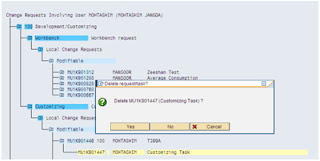


For those configuration items against which transport request pop up does not come up ... following steps would enable you to create it. Case in point is a configuration related to SAP IS-U Work Management. Following is the menu to access the configuration
IMG > SAP Utilities > Work Management > Master Data > Define Service Objects
The table behind this configuration is T399A. Now follow these steps
- Create a new transport request in SE10
- Delete the sub-task

- Double click the transport request and select edit mode

- Specify the values as shown in the following screenshot

- Click the object with keys button (icon with a key) and make the entry as shown in the screenshot below

- Save and you have a transport request against the table T399A
Friday, August 26, 2011
SAP :: How to find BAdI
Business Add-Ins (BAdIs) are SAP enhancement techniques based on ABAP Objects. It has two parts - Definition and its Implementation; Definition can either be SAP provided or user may also create it.
How to find BAdI
You can look for BAdI definition in IMG and in component hierarchy. But there are some easier methods to find a BAdi. They are follows:
Method 1
How to find BAdI
You can look for BAdI definition in IMG and in component hierarchy. But there are some easier methods to find a BAdi. They are follows:
Method 1
These steps should enable you to find a BAdi related to any transaction in a matter of minutes.
1) Go to the transaction SE37 to find your function module.
2) Locate the function SXV_GET_CLIF_BY_NAME.
3) Put a break-point there.
4) Now open a new session.
5) Go to your transaction.
6) At that time, it will stop this function.
7) Double click on the function field NAME.
8) That will give you name of the BAdi that is provided in your transaction.
1) Go to the transaction SE37 to find your function module.
2) Locate the function SXV_GET_CLIF_BY_NAME.
3) Put a break-point there.
4) Now open a new session.
5) Go to your transaction.
6) At that time, it will stop this function.
7) Double click on the function field NAME.
8) That will give you name of the BAdi that is provided in your transaction.
Method 2
1. Goto SE80, open CL_EXITHANDLER (Class)
2. Goto Method, GET_INSTANCE
3. Set a break point at
1. Goto SE80, open CL_EXITHANDLER (Class)
2. Goto Method, GET_INSTANCE
3. Set a break point at
CALL METHOD cl_exithandler=>get_class_name_by_interface
EXPORTING
EXPORTING
instance = instance
IMPORTING
class_name = class_name
CHANGING
exit_name = exit_name
EXCEPTIONS
no_reference = 1
no_interface_reference = 2
no_exit_interface = 3
data_incons_in_exit_managem = 4
class_not_implement_interface = 5
OTHERS = 6.
CASE sy-subrc.
IMPORTING
class_name = class_name
CHANGING
exit_name = exit_name
EXCEPTIONS
no_reference = 1
no_interface_reference = 2
no_exit_interface = 3
data_incons_in_exit_managem = 4
class_not_implement_interface = 5
OTHERS = 6.
CASE sy-subrc.
WHEN 1.
RAISE no_reference.
WHEN 2.
RAISE no_interface_reference.
WHEN 3.
RAISE no_exit_interface.
WHEN 4.
RAISE data_incons_in_exit_managem.
WHEN 5.
RAISE class_not_implement_interface.
ENDCASE.
4) Now open a new session.
5) Go to your transaction.
6) At that time, it will stop this function.
7) Double click on the function field EXIT_NAME.
8) That will give you name of the BAdi that is provided in your transaction.
Method 3:
1. Goto ST05
2. Select SQL trace and buffer trace
3. Activate trace
4. Now run your transaction
5. Deactivate trace
6. Display trace7. A pop will come
8. Enter V_EXT_ACT and V_EXT_IMP as the 2 objects
9. Now display the trace results. It will return all the BAPI and enhancement list in order of their execution.
RAISE no_reference.
WHEN 2.
RAISE no_interface_reference.
WHEN 3.
RAISE no_exit_interface.
WHEN 4.
RAISE data_incons_in_exit_managem.
WHEN 5.
RAISE class_not_implement_interface.
ENDCASE.
4) Now open a new session.
5) Go to your transaction.
6) At that time, it will stop this function.
7) Double click on the function field EXIT_NAME.
8) That will give you name of the BAdi that is provided in your transaction.
Method 3:
1. Goto ST05
2. Select SQL trace and buffer trace
3. Activate trace
4. Now run your transaction
5. Deactivate trace
6. Display trace7. A pop will come
8. Enter V_EXT_ACT and V_EXT_IMP as the 2 objects
9. Now display the trace results. It will return all the BAPI and enhancement list in order of their execution.
Tuesday, August 23, 2011
I wonder why ...
Food for thought ...
Isn't it intriguing that us humans adapt bad habits very easily and take a whole lot while to adapt anything good
I wonder why ...
Isn't it intriguing that us humans adapt bad habits very easily and take a whole lot while to adapt anything good
I wonder why ...
Sindh Govt. Warns Extortionists ("Bhatta Khor" in Urdu) to Leave ...
Now this one is hilarious ...
An official announcement is made by Sindh Govt. for Extortionists and target killers ... read this excerpt of news copied below
"A handout of the Sindh government has outlined important steps which will be taken for restoring peace in Karachi, Geo News reported.
According to the handout, extortionists and miscreants have been asked to leave the city immediately and go somewhere else otherwise strict action will be taken against them."
So ... does this mean if these criminals decide to leave the city ... they will be left alone? will they not be prosecuted? the only problem is that they are doing this in Karachi? They can continue raising hell as long as its not in Karachi? Are these government really stupid or only act dumb???
I am sure each one of us know the answer to the last question ...
Chillzz
SAP IS-U :: Street Light Billing
Street Lights Billing
The blog covers the street light billing scenario based on burning hour method for determination of consumption and its billing.
Courtesy Sohail Ashraf
Configurations Steps
1. Define Operation Types for lighting
The operation type specifies the type of lighting
The operation type specifies the type of lighting
Menu Path: SPRO à SAP Utilities à Contract Billing à Billing Master Data àRate Structure à Operands à Lighting à Define Operation Types for Lighting

In our example, we have defined five types of lighting units as mentioned above.
2. Define Type of Burning Hour Calendar Maintenance
You can define whether the burning hour calendar will be maintained monthly or daily basis.
You can define whether the burning hour calendar will be maintained monthly or daily basis.
Menu Path: SPRO à SAP Utilities à Contract Billing à Billing Master Data àRate Structure à Operands à Lightingà Define Type of Burning Hour Calendar Maintenance

- Burning hour calendar is maintained monthly
- Burning hour calendar is maintained daily
3. Maintain Burning Hour Calendar

In this step, burning hours are defined for relevant operating types with the validity period.
For the purpose of billing, operand with category REFVALUE will be required to be assigned at installation for the purpose of storing the information with respect number of bulbs and KW’s.

Unit of measure is set to KW.
5. Billing Class, Rate Category, and Rate Type
No special configuration is required in billing class and category. Whereas, rate type should permissible for rate category, facts and installation facts.
6. Schema
Menu Path: SPRO à SAP Utilities à Contract Billing à Billing Master Data àRate Structure à Schemas à Define Schemas
In this step, rates are defined in the schema.

Variant REDVAL03 is used to determine the consumption in KWH. The formula is as follows:
STR_LIGHTS à Operand assigned at installation. Information regarding number of bulbs and KWs are store in the operand.
Number of Bulbs * KWs of each bulb * Number of burning hours = STR_LIG_QT (Quantity / Consumption in KWH)
Assignment of operand to installation.
Put following values in billing-relevant data:
OperT: 0002
Entry Value: This represents the capacity of bulb
Unit of Measure: KW
Rep. Factor: Represents the number of bulbs.

Others
Once the above processes are complete, the system is ready for street light billing. Same process shall be followed as for any other scenario i.e. schedule record, create meter reading order and then billing.
Monday, August 22, 2011
SAP :: How to locate a transport request against a configuration item
This (expected) series of blog posts would be a slight digression from the venting part ... it would revolve around SAP and how-to stuff within SAP ...
These posts assumes knowledge of SAP and are, by no means, intended for new SAP users
First in the series is as follows
This would cover the steps used to locate a transport request of a particular configuration item. If you know what object and the type of object that is being captured in the task of the change request then you can work backwards using SE10 (transaction code).
- Go to SE10
- Select Transport Organizer Tools icon (SHIFT + F6)
- At the next screen, Click ONCE on the Search for Objects in Change Requests/Tasks
- Click ONCE on the EXECUTION icon at the next screen
- And this is where you need to know the Object and the Object that you want to search the Change Requests/Tasks for
- So in the new BLANK line click the CHECK BOX and then enter CDAT under DTEL
- In the blank space to the right of CDAT you can now enter V_JBP_CUST
- Then select both MODIFIABLE and RELEASED check boxes
- Hit ENTER just to ensure that it likes what you have put in thus far. If good it should populate the GREY box next to CDAT with R3TR
- EXECUTE
And you should see the change requests and tasks where changes to that object have been captured. The trick is knowing the Object Type
Most basic customizing tables are of type R3TR TABU
Cheers!!!
Sunday, August 21, 2011
A story about how money goes around ...
It is the month of August, on the shores of the Black Sea. It is raining, and the little town looks totally deserted. It is tough times, everybody is in debt, and everybody lives on credit. Suddenly, a rich tourist comes to town. He enters the only hotel, lays a 100 Euro note on the reception counter, and goes to inspect the rooms upstairs in order to choose one.
The hotel proprietor takes the 100 Euro note and runs to pay his debt to the butcher.
The butcher takes the 100 Euro note, and runs to pay his debt to the pig grower.
The pig grower takes the 100 Euro note, and runs to pay his debt to the supplier of his feed and fuel.
The supplier of feed and fuel takes the 100 Euro note and runs to pay his debt to the town's prostitute that in these hard times, gave her "services" on credit.
The hooker runs to the hotel, and pays off her debt with the 100 Euro note to the hotel proprietor to pay for the rooms that she rented when she brought her clients there.
The hotel proprietor then lays the 100 Euro note back on the counter so that the rich tourist will not suspect anything.
At that moment, the tourist comes down after inspecting the rooms, and takes his 100 Euro note, after saying that he did not like any of the rooms, and leaves town. No one earned anything. However, the whole town is now without debt, and looks to the future with a lot of optimism.
And that, Ladies & Gentlemen, is how the United States is doing business today ;)
Democracy ... Shove it
Dedicated to all the upholders of democracy and nothing else ...
If democracy means hundreds of dead bodies each day without remorse ... shove it
If democracy means lack of law and order ... shove it
If democracy means no peace for common man ... shove it
If democracy means lack of economic stability ... shove it
If democracy means heightened inflation ... shove it
If democracy means rampant corruption ... shove it
If democracy means rule of uneducated idiots ... shove it
If democracy means administrative failure ... shove it
If democracy means lack of decision making ... shove it
If democracy means no accountability ... shove it
If democracy means no enforcement of rules ... shove it
And if this is all what democracy stands for ... then really ... SHOVE IT!!!
Subscribe to:
Posts (Atom)